Print Your Lawn Care Calendar and Stick It on the Fridge (Seriously, It Works)
The best lawn care plan is the one you actually follow. And the easiest way to follow a plan is to put it somewhere you can't ignore it. Here's how to turn your MeasureLawn plan into a printable calendar — and why a QR code on your fridge might be the smartest lawn care move you make all year.
You know what kills more lawns than crabgrass, grubs, and drought combined? Forgetting.
Forgetting to apply pre-emergent in March. Forgetting to fertilize in September. Forgetting that you were supposed to overseed two weeks ago and now the window has closed. Lawn care isn't hard — it's 11 tasks spread across 12 months. But those tasks have specific windows, and missing a window means waiting an entire year for another shot.
The fix is embarrassingly low-tech: print your plan and put it where you'll see it every day.
Why Do Most Digital Lawn Care Plans Get Ignored?
You built your MeasureLawn plan. It's sitting on your phone or laptop right now — a beautiful 12-month calendar customized to your grass type, your region, and your exact lawn size. It has every task, every product, every quantity calculated down to the bag.
And you'll forget about it by next Tuesday.
Digital plans suffer from "out of sight, out of mind." They live behind a login, inside a browser tab, buried under 47 other tabs you opened this week. You have to actively remember to check them. And the whole point of a plan is that you shouldn't need to remember — the plan should remind you.
A printed calendar on your fridge, your garage wall, or your toolbox lid does something no app notification can do: it catches your eye passively, every single day, without you having to do anything. You walk past it getting coffee. You see "MARCH: Pre-Emergent" while grabbing milk. The task stays in your peripheral awareness until you do it.
How Do You Print Your MeasureLawn Calendar?
MeasureLawn includes a built-in calendar view of your treatment plan that's designed to be printed or saved as a PDF.
Here's how to get it:
Step 1: Measure your lawn and generate your plan. Enter your address at measurelawn.com, draw your lawn boundary on the satellite map, select your grass type and preferences, and your AI-customized plan generates automatically. This takes about 2 minutes.
Step 2: Switch to Calendar view. On your plan page, you'll see two view options at the top of your treatment plan: "Timeline" and "Calendar." Click Calendar to see your entire year laid out in a clean 12-month grid. Each month shows the season, the tasks scheduled, and a "CURRENT" badge on the active month.
Step 3: Click "Print / Export PDF." The green button in the top right of the calendar view opens your browser's print dialog. From there you can either send it directly to your printer or save it as a PDF file to print later.
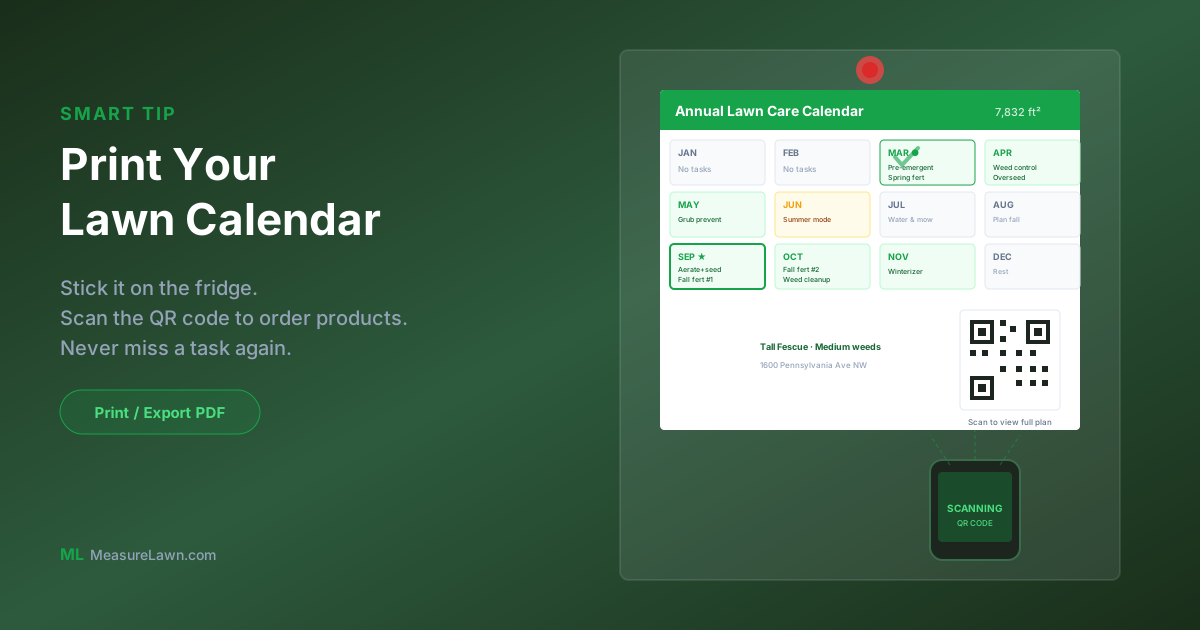
The printed calendar includes your address, lawn size, grass type, every task organized by month, and a custom QR code that links back to your full digital plan — so you can scan it with your phone anytime to see product details and order what you need. It's a complete reference sheet for the year, with a built-in bridge back to the digital version.
Why Should You Put Your Lawn Care Calendar on the Fridge?
Stick the printed calendar on your refrigerator with a magnet. Use a marker to check off tasks as you complete them. This does three things.
First, it creates passive reminders. You don't need to set phone alarms or remember to check an app. The calendar is just there, every morning, reminding you what's coming up.
Second, it creates accountability. A checked-off task feels good. An unchecked task nags at you. The physical act of marking completion reinforces the habit and makes it harder to skip tasks.
Third, it creates a record. At the end of the year, you can see exactly what you did and when. If your lawn looks great in October, you can trace it back to the September aeration and fall fertilizer you didn't skip. If a section struggled, you can see which task you missed and plan to catch it next year.
How Does the QR Code Connect Your Printed Calendar to Your Phone?
Here's the clever part. Your printed calendar tells you what to do and when — but when it's time to actually buy the products, you want the full digital plan, because that's where the exact product recommendations, bag counts, and Amazon links live.
MeasureLawn thought of this. When you export your calendar, it includes a custom QR code printed right on the page. Each month, when the calendar on your fridge tells you it's time for a task, you just pull out your phone and scan the QR code. It takes you straight to your personalized plan — the specific products recommended for your grass type, the exact number of bags calculated for your lawn size, and direct links to order them on Amazon.
No bookmarking. No remembering a URL. No searching for "that lawn site I used back in January." Scan, tap, order. The products show up at your door, and you apply them that weekend.
The printed calendar is the reminder system. The QR code is the bridge back to your shopping list. Together they cover both sides — you never forget a task, and you never guess at products or quantities. It's the perfect loop between low-tech reminders and high-tech precision.
What Does a Printed MeasureLawn Calendar Look Like?
For a Tall Fescue lawn in the Mid-Atlantic (transition zone), your calendar might look something like this:
January–February (Winter): No tasks. Plan your season, sharpen mower blades, order products early.
March (Early Spring): Apply pre-emergent herbicide. Spring fertilizer.
April (Spring): Post-emergent weed control for any breakthroughs. Spring overseeding if needed.
May (Late Spring): Grub preventive application.
June–August (Summer): No treatment tasks — focus on proper mowing height and watering. Your plan's Mowing and Watering tabs have the details for these months.
September (Early Fall): The big month. Core aerate, fall fertilizer (first application), fall overseeding.
October (Fall): Fall fertilizer (second application). Post-emergent weed cleanup.
November (Late Fall): Winterizer fertilizer — the last application of the year.
December (Winter): Rest. Your lawn is dormant.
That's 11 tasks across 12 months. Printed on a single page, it's the most useful piece of paper in your house from March through November.
Why Is a Printed Calendar Better Than an App for Lawn Care?
Lawn care is different from most tasks you track digitally. Here's why paper works better for it.
The cadence is monthly, not daily. You're not checking tasks every day — you're checking once a month or less. Monthly tasks are easy to forget in a daily task manager but impossible to miss on a wall calendar you see 30 times before the task is due.
The audience includes everyone in the household. When the calendar is on the fridge, your spouse, your kids, or your roommate can see it too. If you're traveling when September rolls around, someone else knows that aeration needs to happen. A plan locked in your phone is locked in your phone.
The execution happens outside. When you're in the garage loading the spreader, you're not looking at your phone. A printed calendar on the garage wall or inside the shed door puts the information exactly where you need it.
The satisfaction is tangible. Checking off a digital task triggers a tiny dopamine hit. Crossing off a task with a thick marker on a printed calendar that's been staring at you for weeks? That feels like progress.
How Do You Update Your Calendar Each Year?
Here's the habit that separates people with great lawns from people who are always "meaning to get around to it":
Every January, spend 2 minutes on MeasureLawn. Your lawn measurement is saved, so you don't need to re-draw it. Review your plan for the year — it updates automatically based on your location's conditions. Print the calendar. Stick it on the fridge. Done.
That 2 minutes of preparation in January prevents 11 months of "wait, what was I supposed to do this month?" It turns lawn care from a vague intention into a concrete schedule. And schedules get followed.
How Do You Get Started With Your Printable Lawn Calendar?
Your lawn care calendar is waiting. Measure your lawn (or revisit your existing plan), switch to Calendar view, and hit Print. Tape it to the fridge tonight, and you won't miss another task all year.
Get your printable lawn care calendar →
Ready to measure your lawn?
Get a free, AI-customized lawn care plan with exact product quantities for your property.
Measure My Lawn — It's Free →